Skiing Game Online⛷️Ski Rush 3D
Carve down an endless mountain.
About Ski Rush 3D
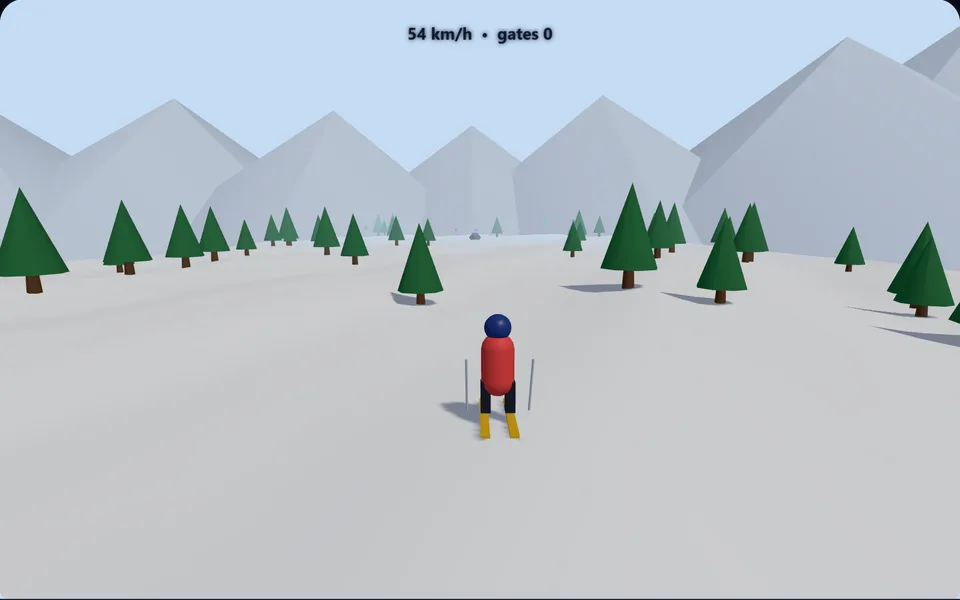
Race down a snowy 3D slope, weaving between trees and rocks, passing slalom gates for points and launching off ramps for air. The run gets faster and busier the further you go.
Controls
- ▸Left / Right (or A / D) to carve
- ▸Touch: left / right buttons
- ▸P or Esc to pause
- Difficulty
- ★★★★★
- Session
- ~3 min
- Plays
- 0
- Time played
- 0 min
How to play Ski Rush 3D
Your skier races down an endless 3D mountain, picking up speed all the time. Steer with the Left and Right arrow keys, A and D, or the on-screen buttons on a touch screen, weaving between trees and rocks. Hitting either one is a wipeout and ends the run. The further you get, the closer together the obstacles come.
Your score is the distance you travel in metres, plus 50 points for each slalom gate you pass between, plus air points. Blue ramps launch you into the air, and the longer you stay up, the more air points you score when you land. High in the air you sail over rocks, and over trees too on a big enough jump. Missing a gate costs nothing.
Tips
- ▸Steering is slower in the air, so line up your landing before you hit a ramp.
- ▸Gates alternate from side to side, so start carving towards the next one early instead of swerving at the last moment.
- ▸A gate is worth 50 points, the same as 50 metres of skiing. Skip one if going through it means passing close to a tree.
- ▸Rocks are low, so a good jump from a ramp carries you safely over a cluster of them.
Ski Rush 3D FAQ
- Does Ski Rush 3D ever end?
- Only when you crash. The slope is endless, so the run continues until you hit a tree or a rock, and your score is saved if it beats your best.
- How is the score worked out?
- One point per metre travelled, 50 for each gate you pass through, and air points for time spent in the air after a ramp.
- Can I play it on a phone or tablet?
- Yes. Left and right buttons appear on touch screens. On a computer, use the arrow keys or A and D.